How to Burn DVD-Video Files with RecordNow Max
RecordNow Max 4.5, though an older piece of software, is often regarded as the single best burning software ever made. It gives perfectly compliant DVD-Video burns, and uses the exceptional Prassi pxengine under the hood. Also works for the RecordNow Deluxe 4.6 version, as there were few differences.
Note: ImgBurn is better software to burn DVD-Video with. Not only is it 100% compliant with the DVD-Video specification, but it’s freeware too.
PXengine Hacks
In recent years, it seems the pxengine has received more updates from users online than from the company that now owns the software (Sonic Solutions). They have moved on to support their newer RecordNow 6 and 7 versions, which are a joke compared to the solid versions of yesterday. RNM was made originally made and sold under the Veritas and Stomp brands. Sonic essentially ruined the software by making it a weak wizard-driven piece of newbie-audience junk. This also means “upgrades” will leave most user wanting more. You can download the NEC 3500 and Pioneer 109 hacks from this site – just download, unzip to your hard drive, and then install over the old one in the RNM folder.
Burn DVD-Video disc
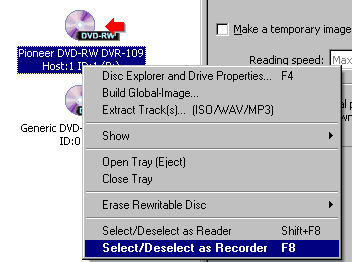
Open RNM. Close wizard. Select the burner. Right-click, go down to SELECT AS RECORDER. Red arrow appears.
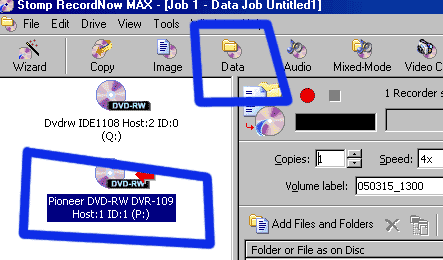
Select as DATA DISC. DVD-Video is nothing special. It’s just a data disc with certain settings (no multisession, UDF, etc … we’ll set those in the next steps).
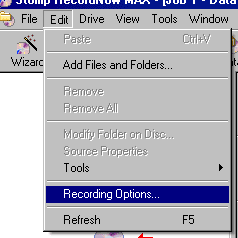
Goto EDIT -> RECORDING OPTIONS:
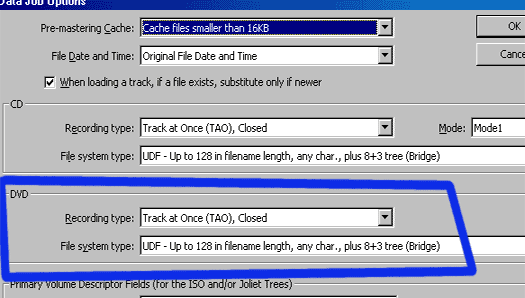
Change the setting for DVD to match these:
Drag files from Windows to the RNM window. Name/label your disc. Set the burn speed. Record. Leave other settings alone:
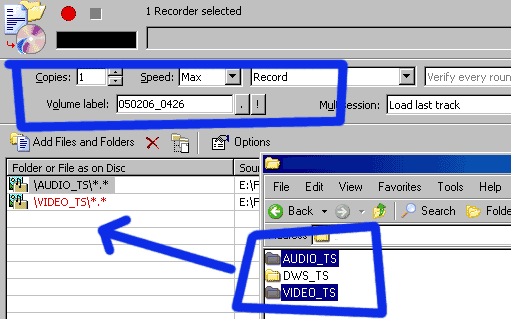
Hit the big orange/red button to burn. And there you go. 100% compliant DVD-Video burning.
Copyright Notice: All guides, articles and editorials found on digitalFAQ.com are copyright by The Digital FAQ and/or the respective authors. Articles may not be copied, borrowed, full-quoted or reproduced in any manner, online or in print, which includes blogs and forums, without the written email consent of Site Staff (which may or may not be given, for free or fee). Know that digitalFAQ.com staff does routinely monitor online plagiarism, and we do send takedown notices to site admins and/or web hosts (DMCA et al legal actions) as is necessary. If you would like for others to read articles found on The Digital FAQ, simply link to our content. (Note: Printouts for personal use is specifically allowed.)
