
Video Hardware Suggestions; Best VCRs to Convert Tape to Digital
Analog video formats, such as VHS, suffer from a few inherent quality-reducing errors.
The more money you dump into this hobby, the better quality results you will get. But this is a multi-faceted hobby, with many things to consider. Remember, this is digital video. So it’s important to take care of both the “DIGITAL” and the “VIDEO” aspects, whereas “digital” is all the computer stuff, ranging from capture cards to burners to software, leaving “video” as all the source material and technique and playback aspects.
It takes more than a new computer with a burner and capture card to make good digital video. That’s what this page is for: playback aspects. The two important devices to focus on are a “VCR” and a “TBC”.
VCR Suggestions
Your typical VHS VCR is not good enough for digital video. It can playback tapes, but VHS tapes are a lossy format to begin with, and many VHS VCRs tend to amplify those errors rather than hide them. VHS is a low resolution analog format, and is prone to have noise that needs to be removed. S-VHS is the best choice, though it costs a bit more.
VHS Players: If you insist on using a VHS VCR, normally due to budget restrictions, then try to find a player with a good tracking range that will play anything you throw at it. It will be less likely to go off track at the slightest error. Only use HiFi 4-head machines. The 6-head machines are no better than 4-head machines.
Suggested VHS VCRs:
- Sharp: These tend to track really well with digital tracking, and put out a fairly clean signal. Tapes made on this machine play almost anywhere. Be sure to turn off the “enhancement” filters as it makes the video grainy. Admiral brand units are also Sharp-made.
- Panasonic: These are great machines, and record tapes that play almost anywhere, as well as putting out a decent signal. It does have a habit of going to blue-screen on video errors.
- Sony: These are normally decent, but as with all Sony items, that can change from model to model. Many of them play any tape and record well.
- JVC: The VHS units are not too shabby. Certainly not as good as JVC S-VHS equipment, or even the three VHS models mentioned above, but they often work okay.
- Toshiba: These are pretty good units, especially the 6-head models, though they tended to break easily. Very good image quality, at least for a regular VHS unit.
IMPORTANT! Avoid any 2-head or mono VCR. Emerson, Magnavox, Philips, GE and Zenith brand machines are terrible. Most low-end and no-name brands are horrible machines, often adding errors to tapes and outputting noise that is seen by capture cards. You must use a VHS VCR that has RCA. Never use coax unless you are recording directly from broadcast, satellite (from the coax output) or cable.
Super VHS (S-VHS) Players: If you have a little money (about $200-400), buy a decent Super VHS VCR, ones that come equipment with digital noise reduction, audio/video filters, and built-in time base correctors (line TBC for removing noise and cleaning video). Many brands of S-VHS VCRs exist, but know that JVC was the inventor of VHS and Super VHS technology, and they continue to lead the industry in these machines, especially in terms of quality. Panasonic, Mitsubishi, Sony, and Phillips all make S-VHS machines too.
All JVC models have a few nifty features that any video fan should enjoy:
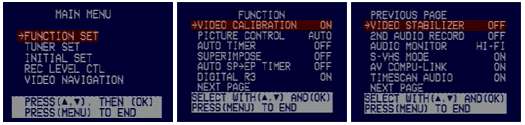
- Video calibration. This is similar to tracking, but so much more. It more precisely control the playback quality of your tape, maintaining both tracking and signal quality.
- Picture Control. This allows you to control how your pictures looks on screen, and have several modes, including 1) soft, 2) sharp, 3) norm/auto, and 4) edit/raw. Most times, leaving the setting on AUTO will provide the best results. EDIT is used to leave the video in raw form, without any kind of quality calibration, and is meant mostly for the editing functions of the VCR. SHARP is good when the video is blurry. SOFT makes the video a bit softer, often covering up noise in the signal, and is extremely useful with cartoons that have quality issues as it covers up video grain in like-colored areas.
- Digital R3. This is a feature found on the upper-end models, and is edge correction. It is most noticeable on cartoons, but gives a cleaner break in contrast and in smearing or blurry areas of the video.
- Video Stabilizer. This is a very nifty feature for tapes that have a hard time playing in other VCRs or have tracking issues that cause the tapes to bounce. This is a kind of bounce or jitter that is due to the physical aspects of the tapes, and cannot be corrected by a TBC. It must be corrected at the playback level, and this feature provides a solution to that error. The only disadvantage of this feature is that it cannot be used in conjunction with the built-in TBC/DNR filter. If turned on while TBC/DNR is enabled, it will first shut off that feature before initializing the stabilization filters.
- Audio Monitor. This is a great feature for older tapes that have buzzing in the sound or have tracking errors that cause the audio to crackle or break. It can use MONO, HIFI, L CHAN, R CHAN, or MIX. The cracking is often removed by changing the audio to MONO. While it slightly muffles the sound, it will clear out the buzzing that is located in the upper frequencies of the HiFi channel. The MIX is best unused, as it adds a “tunnel” effect to the sound. L and R CHAN allows you to pick just one channel for audio.
- TBC/DNR. This is the built-in time base corrector on the JVC unit, that incorporates BOTH TBC and digital noise reduction at the same time. It is a button on the front of the machine that glows red or green when turned on. This feature alone makes these machines worth the price. These seem to provide more horizontal corrections than vertical ones.
- Rec Level Control. This is an audio level filter. It allows you to raise or lower the volume of the audio. Although it is supposed to only work for recording, on some models, in some situations, it seems to work for playback also, including pass-through!
Suggested S-VHS VCRs: Any one of these will do quite nicely at clean playback of both VHS and S-VHS tapes:
- JVC 9600+ models (NTSC): HR-S9911U, JVC HR-S9900U, JVC HR-S9800U, JVC HR-S9600U
- JVC 7600+ models (NTSC): JVC HR-S7900U, JVC HR-S7800U, JVC HR-S7600U
- JVC SR “Professional” models (NTSC): JVC SR-V10U, JVC SR-V101US
- Panasonic AG-1980P + rebadges/clones — also suggested as best for VHS-C and S-VHS-C tapes)
- JVC 8900+ models (PAL): JVC HR-S8965EK
- JVC 7900+ models (PAL): JVC HR-S7965EK
- JVC SR “Professional” series: JVC SR-V10E
- Panasonic NV-FS200 (PAL version of NTSC 1980) + rebadges/clones
Which S-VHS VCR models are not so good? The low-cost $100-200 S-VHS units, such as the JVC 2000-5000 series machines (ex: JVC HR-S2900U), lack the TBC/NR unit, and are also not very well-made. These are decent machines for recording, but the playback filters are very weak compared to the better series models. These tend to go out of alignment easily, and alignment errors are the main reason tapes get “eaten” when played. (FYI: The other reason is heat or faulty tape mechanics.)
What’s a TBC? Which one should I get? Where?
While anybody not living in a cave since the late 1970s knows a VCR is a video cassette recorder, many of you are probably asking what a TBC is. TBC is the shorthand name for a time base corrector, a device that adjusts the signal for proper playback, often discussed as “cleaning” the video signal.
Time base correctors come in many forms. They range in price from $40 at your local Best Buy to $1,000s at mail-order video houses. (But before you get your keys and wallet, let me quickly point out that the $40 unit at Best Buy is junk and barely works, and not really a TBC by true definition. So sit back down and keep reading…) I’ve categorized them briefly:
- Non-TBC Filters. Although often advertised as a TBC, or as a device that can perform TBC functions, these are actually more of a cheap filter/processor that do almost nothing. These units are good mostly for removing Macrovision, if even that (some claim to remove anti-copy, but fail miserably when tested). The corrections are limited and visually unnoticeable. At best, it may help with reducing dropped frames. Example: SIMA CopyMaster. Price $40-100
- Line TBC. Your typical “line” TBCs. These are great at removing visual errors, but do almost nothing for signal purity. Be sure it can be turned on or off with a switch or menu option, as a line TBC is not a perfect device, and can sometimes make a signal look worse. Many are merged with DNR (digital noise reduction circuitry), specifically advertised to “clean up” video. Example: JVC S-VHS VCRs and certain DVD recorders. Price $100 (or about $100 worth of the price if included as a feature of the unit)
- Full Frame TBC. Your typical “full frame” TBC. Often called semi-pro or pro-sumer. These work mostly to purify the signal quality, as opposed to the line TBC that corrects image issues. My DataVideo TBC-1000, for example, vertically corrects the video and synchs frames, preventing almost all vertical bouncing or jittering in the image. This is most useful with older, non-commercial VHS tapes. Example: DataVideo TBC-1000, AVToolbox AVT-8710. Price $200-350
- Professional TBC. Does everything but cook your breakfast. These often have features hobbyists and amateurs would never use or would not know how to use, including chroma keying, color-bar generation and freeze-frame. Example: DataVideo TBC-4000/6000. Price $900+
Suggested TBC? The DataVideo TBC-1000 or AVToolbox AVT-8710. TBCs can be found at professional video stores like B&H Photo and Video.
Copy protection notes: Anti-copy protection methods, most commonly Macrovision’s patented form of anti-copy, are little more than artificially-inserted video errors that confuse the AGC (automatic gain control) on your video equipment. A good TBC filters out all errors, including the artificial ones.
Examples of a S-VHS VCR and TBC in use
Although this topic will be more thoroughly covered in the video restoration guides for posts in the video restore/filter forum, here is a quick peak at what a S-VHS VCRs and TBCs can do to help improve your video. The following images are of a JVC HR-S9800U and DataVideo TBC-1000 in action. (NOTE: The DataVideo TBC-1000 was used to remove slight jitter in these tests, something that cannot be illustrated with images.)

Raw source. Using JVC 9800 (TBC off)

Using JVC 9800 (TBC on). Notice the wavy distortions in the image have disappeared.

Video in JVC 9800 (TBC off)

Video in JVC 9800 (TBC on), video torn at top of screen. This is a rare error that happens on some source.
