Quantcast MPEG Encoder and divx - digitalFAQ.com Support Forum
Go Back   digitalFAQ.com Support Forum > Digital Video > DVD Project Help > Encode, Convert

Reply
LinkBack Thread Tools
  #1  
05-02-2005, 04:37 PM
strangepork strangepork is offline
Premium Member
 
Join Date: Oct 2004
Posts: 29
Thanks: 0
Thanked 0 Times in 0 Posts
LS,

i have a divx movie that is (widescreen with no black bars)

w704 x h304


audio
bitrate 448

video rate
frame rate 25
data rate 227
video sample 24

the original divx video is widescreen with the black bars, they are chopped off. once again it is a perfectly trimmed widescreen.

looks great on my computer but i want to make it a dvd. so i used mpeg encoder (IMHO, better than tmpg ).
the default settings caused tmpgdvd author to have a fit and say not compatible, and to change the resolutions.

well i was able to find one that it accepted but it really sucks everything looks stretched vertically. its still viewable but damn i want to original look.

my final output
mpeg 2, 352x480...29fps

works but very awkward.

any suggestions???
ps this is my second question
[img]smileys/smiley11.gif[/img] Edited by: strangepork
Reply With Quote


  #2  
05-03-2005, 12:11 AM
admin's Avatar
admin admin is online now
Site Staff / Media Project and Technical Adviser
 
Join Date: Oct 2003
Posts: 3,983
Thanks: 112
Thanked 417 Times in 363 Posts
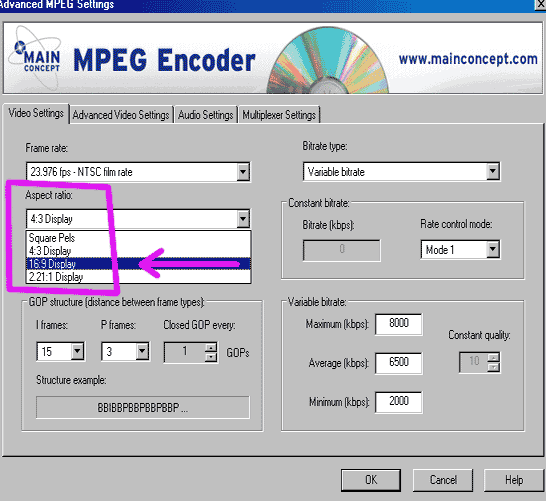
Changing framerates almost never results in super quality recordings. I would leave it as PAL formatted video, encode it to 720x576 25fps in your encoder, with 16:9 flags, and then be sure your DVD player can play PAL material.

As far as "MPEG Encoder" who makes that? Is that MainConcept by chance? It's not hard to be the raw quality of TMPG. TMPG is good, but is most useful with filters or non-standard oddball sources. For already-clean source, there are better choices, though more expensive.


__________________
If this site has been as helpful as a book or magazine, then Donate a few Dollars or Upgrade your Membership.
Don't forget to Like Us on Facebook or Follow Us on Twitter for special news and deals. Thanks!
Reply With Quote
  #3  
05-03-2005, 12:28 AM
strangepork strangepork is offline
Premium Member
 
Join Date: Oct 2004
Posts: 29
Thanks: 0
Thanked 0 Times in 0 Posts
Quote:
Originally Posted by admin
Changing framerates almost never results in super quality recordings. I would leave it as PAL formatted video, encode it to 720x576 25fps in your encoder, with 16:9 flags, and then be sure your DVD player can play PAL material.
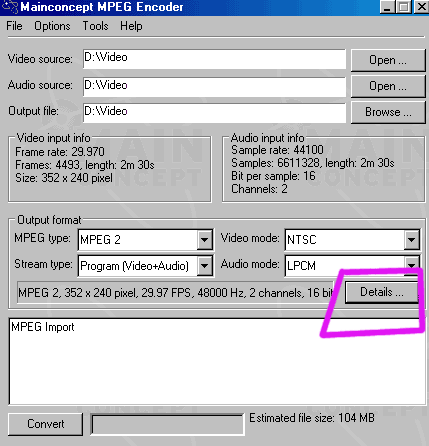
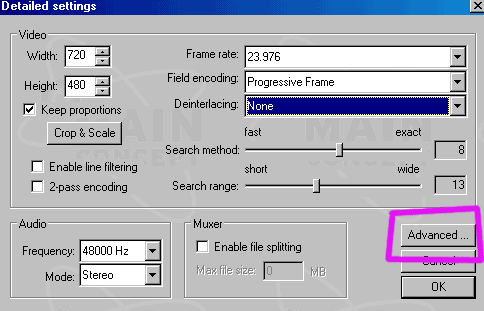
Yes it's main concept. Where would be the 16:9 flags?? I do have a PAL to NTSC dvd player, so it should not be a problem. My main concern is to get it into tmpgdvd author with no hassle.

can you tell me exactly what to select in tmpg express 3.0. ive tried using mpeg encoder but it just doestn look right, everything keeps defaulting to 29fps. So ill just go back to thre drawing board with tmpg

i cant find where to change the frame rate. Also in the editing button the picture looks severly stretched.
Thanks.

Edited by: strangepork
Reply With Quote
  #4  
05-08-2005, 04:25 AM
admin's Avatar
admin admin is online now
Site Staff / Media Project and Technical Adviser
 
Join Date: Oct 2003
Posts: 3,983
Thanks: 112
Thanked 417 Times in 363 Posts
[img]uploads/admin/mc169a.gif[/img]

[img]uploads/admin/mc169b.gif[/img]

[img]uploads/admin/mc169c.gif[/img]

__________________
If this site has been as helpful as a book or magazine, then Donate a few Dollars or Upgrade your Membership.
Don't forget to Like Us on Facebook or Follow Us on Twitter for special news and deals. Thanks!
Reply With Quote
  #5  
05-08-2005, 04:26 AM
admin's Avatar
admin admin is online now
Site Staff / Media Project and Technical Adviser
 
Join Date: Oct 2003
Posts: 3,983
Thanks: 112
Thanked 417 Times in 363 Posts
Just FYI, my examples here show some NTSC film source footage. You'll of course want the PAL specs of 720x576, 25fps. From the sound of things, it is progressive source DIVX, not interlaced.
__________________
If this site has been as helpful as a book or magazine, then Donate a few Dollars or Upgrade your Membership.
Don't forget to Like Us on Facebook or Follow Us on Twitter for special news and deals. Thanks!
Reply With Quote
  #6  
05-10-2005, 03:34 AM
strangepork strangepork is offline
Premium Member
 
Join Date: Oct 2004
Posts: 29
Thanks: 0
Thanked 0 Times in 0 Posts
many thanks...
Reply With Quote
Reply


Similar Threads
Thread Thread Starter Forum Replies Last Post
What encoder for ac3 777sp2 Encode, Convert 5 11-14-2005 01:36 PM
Divx DVD Player suggetions d.smyth Home Entertainment and Videography 5 09-27-2005 07:18 AM
Some .avi files.... divx ID on them.. emokid Encode, Convert 2 09-08-2005 09:26 AM
LSI USB encoder admin Capture, Record, Transfer 0 02-15-2005 06:07 AM
DIVX jrnyhead Home Entertainment and Videography 1 04-22-2004 04:04 PM

Thread Tools


All times are GMT -5. The time now is 03:03 PM  —  vBulletin Copyright © 2011 Jelsoft Enterprises Ltd  —  SEO by vBSEO