Quantcast Soundforge - digitalFAQ.com Support Forum
Go Back   digitalFAQ.com Support Forum > Digital Video > DVD Project Help > Edit Video & Audio

Reply
LinkBack Thread Tools
  #1  
07-02-2005, 01:58 AM
ninjastriker ninjastriker is offline
Free Member
 
Join Date: Jun 2005
Location: , , United Kingdom.
Posts: 54
Thanks: 0
Thanked 0 Times in 0 Posts
I have just installed soundforge 6.oa (build 150) but the problem is i can't open any mpeg video.

It says that i need a mpeg plugin which i have to buy in order to open and save the files in mpeg format.

The problem is i can't buy it as it requires a credit card, is their a free download of the plugin i can use or is their another way round this.
__________________
R.I.P. Curtis Trading site 2004-2008.
Reply With Quote


  #2  
07-02-2005, 02:03 AM
lordsmurf's Avatar
lordsmurf lordsmurf is offline
Site Staff / Freelance Video Restorer
 
Join Date: May 2005
Posts: 2,317
Thanks: 108
Thanked 172 Times in 150 Posts
SoundForge is for audio.
Demux your video, then open the audio portion.

But honestly, use BESWEET (freeware) to convert the MP2 or AC3 audio into WAV, and let SF only have wave natively. Do what you need, save WAV.

Then go back to BESWEET and convert to AC3, then use that to author.

You'll just deal with elementary streams at author.

This also means you need to pre-edit in something like Womble, don't edit in the authoring app.
__________________
- Did my advice help you? Then become a Premium Member or make a donation.
- Find television shows, cartoons, DVDs and Blu-ray releases at the TVPast forums.

Reply With Quote
  #3  
07-02-2005, 02:14 AM
ninjastriker ninjastriker is offline
Free Member
 
Join Date: Jun 2005
Location: , , United Kingdom.
Posts: 54
Thanks: 0
Thanked 0 Times in 0 Posts
how do i demux the video. i just got the besweet program, so where do i go from their?
__________________
R.I.P. Curtis Trading site 2004-2008.
Reply With Quote
  #4  
07-02-2005, 02:23 AM
lordsmurf's Avatar
lordsmurf lordsmurf is offline
Site Staff / Freelance Video Restorer
 
Join Date: May 2005
Posts: 2,317
Thanks: 108
Thanked 172 Times in 150 Posts
TMPGENC MPEG TOOLS to demix.
open the TMPGENC encoder, goto FILE -> MPEG TOOLS and simple demux

__________________
- Did my advice help you? Then become a Premium Member or make a donation.
- Find television shows, cartoons, DVDs and Blu-ray releases at the TVPast forums.

Reply With Quote
  #5  
07-02-2005, 02:30 AM
lordsmurf's Avatar
lordsmurf lordsmurf is offline
Site Staff / Freelance Video Restorer
 
Join Date: May 2005
Posts: 2,317
Thanks: 108
Thanked 172 Times in 150 Posts
Alright curtis, this guide here is for WAV -> MP2.
What you want to do is opposite, MP2 -> WAV.
Just use common sense, adjust guide as needed.

.
.
.

First, you need 3 pieces of free software:
BESWEET
BESWEET GUI
TMPGENC


====== STEP 1 === DOWNLOADING/INSTALLING THE SOFTWARE ======

http://dspguru.doom9.net for BESWEET and GUI (official site)
http://www.tmpgenc.net/e_download.html for TMPGENC (official site)

Use WINZIP to unzip the Besweet file. Extract the files to "C:\Program Files\Besweet". The software we'll be using is in "C:\Program Files\Besweet\GUI07b" folder and is called "BeSweetGUI.exe". You can drag a shortcut to your desktop to make it easy to find.

Any new TMPGENC is fine. The 30-day trial is for MPEG2 encoding. The MPEG1 and TOOLS of the software are freeware, no expiration. We're not encoding anything anyway, just using the TOOLS.


====== STEP 2 === CONVERTING WAV TO MP2 WITH BESWEET ======

Open BESWEET GUI. Important stuff in red boxes, with numbers. You'll see this:

#1 Set the location for where you want to save the MP2 files. Type anything in as the filename. I usually just mash some keys. This will not affect your file names in any way.
#2 We want the MP2 encoding option
#3 This is the TOOLAME options, the MP2 encoding options.
#4 This is the BATCH mode button. I never use single mode. This is why we did not bother to set a source in #1.


Now that it's all setup, go to BATCH MODE. Open up MY COMPUTER, and then drag all the WAV files into this window. Click WAV -> multiple MP2's.
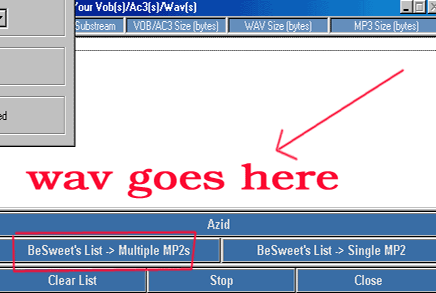


Sit back and wait. It should not be more than a couple of minutes per file. You're looking at 10 minutes max for a couple of movie-length files.


.
.
.
.
.

That should make sense.


__________________
- Did my advice help you? Then become a Premium Member or make a donation.
- Find television shows, cartoons, DVDs and Blu-ray releases at the TVPast forums.

Reply With Quote
  #6  
01-07-2006, 01:11 AM
joker joker is offline
Invalid Email / Banned / Spammer
 
Join Date: Jun 2005
Location: Arkham Asylum, , .
Posts: 16
Thanks: 0
Thanked 0 Times in 0 Posts
I have a few mpegs (ac3 audio) that I was gonna use Besweet and Soundforge to boost the audio.

After covverting the ac3 to wav with Besweet I noticed the audio was already boosted by Besweet. Is this possible? Does Besweet actually raise the level of the audio when it converts to wav?


I then compared the mpg file with a BEFORE and AFTER, and there's a definite difference.
It saved me a step.

Reply With Quote
  #7  
01-07-2006, 08:31 AM
lordsmurf's Avatar
lordsmurf lordsmurf is offline
Site Staff / Freelance Video Restorer
 
Join Date: May 2005
Posts: 2,317
Thanks: 108
Thanked 172 Times in 150 Posts
AC3 is just softer by nature.
__________________
- Did my advice help you? Then become a Premium Member or make a donation.
- Find television shows, cartoons, DVDs and Blu-ray releases at the TVPast forums.

Reply With Quote
Reply


Similar Threads
Thread Thread Starter Forum Replies Last Post
Stronger SoundForge hiss filters? admin Restore, Filter, Improve Quality 0 10-12-2009 09:50 PM
SoundForge & Goldwave - Workflow Superstar Restore, Filter, Improve Quality 105 07-23-2009 07:57 PM
Soundforge 8.0 problems connected365 Edit Video & Audio 9 05-01-2006 08:58 AM
Soundforge is best tool to restore audio admin Encode, Convert 0 05-29-2004 06:37 AM
Mp2 in Soundforge lantern Encode, Convert 5 05-10-2004 07:44 AM

Thread Tools


All times are GMT -5. The time now is 04:12 PM  —  vBulletin Copyright © 2011 Jelsoft Enterprises Ltd  —  SEO by vBSEO
