
DVD Burning and Media Quality Concepts
Once upon a time, Pioneer was the only DVD burner drive, and about a dozen manufacturers made blank discs to choose from. As time has gone on, the once-simple task of buying and burning high quality media has become an overly-complicated voodoo art. There are several mitigating factors that can affect your burning experience, most of them negative.
Burner Hardware and Drive Firmware
When it comes to achieving quality burns, the burning hardware and the drive firmware are equally as important as good media. The burning hardware refers to the DVD or CD burner drive. Drive firmware is software written onto EEPROM chips inside the drive, to help control how the device behaves.
Now, do not misunderstand. You cannot take inferior media and a good burner and magically get good results on a consistent basis. Good media will always be required. Nor can you use a super-cheapo discount bin burner drive and consistently get excellent burns, even with the very best media available.
The best drives, as far as burning quality is concerned, are manufactured by Pioneer, Samsung and LiteOn. These are often sold under their own flagship name brands, as well as re-branded by other companies. For example, Sony currently uses Samsung drives. This is not to say other drives are bad, but many of them have imperfections or obnoxious quirks (see the BTC case study for an example of this phenomenon).
Concerning firmware, you merely need something that works. There is no need to be an upgrade junkie, one of those individuals that will upgrade simply because it is new and available. Drive manufacturers usually support their drives until the next model comes out (about one year), sometimes a bit after that, releasing official firmware downloads on their Web sites. There are also hacked firmware created by drive owners, which will add or improve support for certain media, as well as remove speed and region restrictions. While uncommon, it is true that a firmware upgrade could kill the drive, but do not let that scare you from making needed changes. Visit RPC1.org for a list and download locations of drive firmware, and visit the Myce.com forums for hardware discussions by other drive owners.
NEC case study: CMC Magnetics is one of the largest worldwide suppliers of cheap DVD media. Quite a few companies re-brand CMC media under their own label. However, these discs often rates poorly on media tests. CMC is also not consistent in quality control. For example, two 100-count spindles of CMC DVD+R bought from the same store at the same time could give a result where one spindle yielded 99 good burns, and the other one had only 43 good burns. For whatever reason, NEC burners can often yield good burns on CMC discs, especially the CMC DVD+R media (although it is still not consistently good). Most all other burners, the success rate is far lower.
BTC case study: Behavior Tech Computers (BTC), is a computer accessory company that, among other items, made DVD burners. Their optical drives are well-respected for their ability to read even the most stubborn of discs. However, their DVD burners tend to be very finicky with burning, regardless of firmware or drive model. It is not uncommon for Taiyo Yuden media to give a 100% failure rate, where all discs on a spindle fail to burn. Yet Taiyo Yuden is excellent DVD media.
Burn Speeds
The speed at which a disc is burned, often referred with terms like 1x, 2x, 4x, 8x, etc., is a decision that must be made after assessing a few criteria. These include the official “rating” of the disc, the write strategy of the media, the firmware of the burner, and the overall quality of the media. Do not be fooled by myths of “lower is better”.
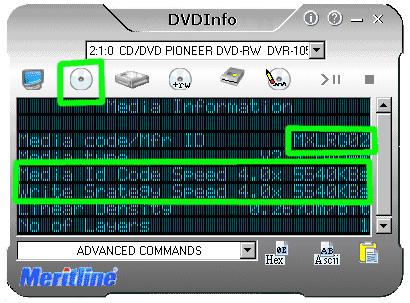
Write strategy. All discs should come with a certified write strategy. In theory, it means that the disc has been tested by either the DVD Forum or the RW Alliance and certified to burn up to the speed printed on the discs and package. Much like the media ID, this information is stored on the disc, and can be read by media ID software. For example, the image below shows an Apple-branded MXLRG02 4x DVD-R viewed in DVDInfo. Write strategy (media ID speed) is determined by the data written on the disc.
When DVD burning was first made possible, the idea was to never burn faster than the official disc rating. These days, this activity is still suggested, though not as clear cut as it once was. For example, Pioneer 109 drives can burn YUDEN000T02 DVD+R media, a disc officially rated at 8x, up to 12x speed and achieve 99% or better success rates. Taiyo Yuden made a disc that was far better than 8x and a 12x official rating does not exist. Luckily, there are not many situations like this, but they do exist. Again, it is suggested to never burn higher than the official rating.
The “x” speeds. The “x” in a burning speed means almost nothing. It is not a multiplication of anything, especially when Z-CLV and P-CAV burning is involved. As you surpassed 4x speeds, time savings diminishes quickly, especially between 8x-16x speeds. Speeds range on several factors, including disc type, burning method, and the drive itself.
- 1x DVD burn takes approximately 55-60 minutes
- 2x DVD burn takes approximately 25-30 minutes
- 2.4x DVD burn takes approximately 20-25 minutes
- 4x DVD burn takes approximately 14-16 minutes
- 6x DVD burn takes approximately 9-12 minutes
- 8x DVD burn takes approximately 8-9 minutes
- 12x DVD burn takes approximately 7-8 minutes
- 16x DVD burn takes approximately 6-7 minutes
Zonal burning. It’s pretty much impossible, at least with current hardware, to spin a disc at 16x from start to finish. Blame physics. With 4x and slower media, the drive spun up to the burn speed, and burned 4x from beginning to end, using the CLV (constant linear velocity) burning method. The disc also had a uniform look on the burned dye.
With the advent of 8x media, Z-CLV (zonal constant linear velocity) and P-CAV (partial constant angular velocity) were introduced. Z-CLV starts at a speed like 4x, then at a certain point in the media, jumps to 6x, then 8x, etc., until it reaches the maximum speed. Sometimes a 16x Z-CLV burn will only burn a few hundred MB at 16x, which is why “x” speeds mean almost nothing anymore. P-CAV is similar, but does not jump speed. It increases velocity from 4x to 4.5x to 5x, etc., until it reaches it’s top speed. Much like Z-CLV, it may not hit max speed until the last 30 seconds worth of burning. This is why a 12x burn is almost an identical wait time to the speed of a 16x burn.
 |  |
| This CLV burn is the same color from beginning to end. | Z-CLV burning methods leave a mark on the dye, as the burn speed alters color slightly. These zones are perfect circles with a hard edge lines. Not to be confused with imperfect-shaped dye rings caused from inferior media. P-CAV may gradually change colors. |
Myth of burning slower. Discs are made to perform at an ideal rotational speed, which is where write strategy originates. The disc will perform best up to a certain speed, and the drive will not permit any faster. The inverse is the same, but until recently, drives would not prevent unreasonably low speeds. Modern human nature tends to want more speed and more power, so this was not really a concern.
But believe it or not, there are still people who insist on waiting 55-60 minutes to burn a CD or DVD at 1x speed, because they are convinced anything faster will yield a bad or “lower” quality burn. However, burning too slow is often just as bad as burning too fast. Because of this unreasonable impulse to go too slow, some discs and drives now block out the lower range too (and causes problems, see the 16x section for more).
There was some truth to that statement in the beginning, (circa 1995 for CD-R, 2001 for DVD-R), but those days are long gone. The only reason that myth ever held truth was because 2x was the fastest speed, and burning a single full or half speed under the maximum rating is helpful on lower quality blank CD/DVD media. If you are worried about quality, or if the media tends to be dodgy quality at the maximum rated speed, then burn a full or half step slower. No more. With a 8x disc, for example, a burn speed of 4x or 6x would be optimal.
Age of 16x DVD media. When DVD burning technology was developed, CD burning had just hit its prime with 16x speeds and BurnProof technology with decent buffers. For years, consumers whined that DVD burning was too slow, as compared to CD (regardless of the storage size differences), so 16x has long been a goal of drive manufacturers. And this is probably where speeds will stop.
The main drawback to this now-achieved goal, is that it seems rushed, given the experiences of those who routinely attempt 16x burning. It’s become a common practice to burn at 8x or 12x on 16x media, because it simply performs poorer, with a higher coaster count, at the 16x speed. Advanced PI/PIE/PO and speed read tests also show a degraded level of performance. Even high-grade media like Taiyo Yuden and Mitsubishi is not immune to this problem. And it’s not like the wait is any longer between 8x-16x anyway, just 1-2 minutes in most cases.
DVD recorders are most affected, with their 1x real-time recording method. Most 16x media is not true multi-speed media, so burning at 1x yields a high coaster count, assuming the machine will even acknowledge the blank disc. Quite a few DVD recorders, even ones purchased as recently as 2005-2006, are known to reject 16x discs, refusing to even see the blank. Luckily, Mitsubishi (Verbatim branded) 1x-16x MCC DVD-R tends to work well in this situation.
Dye Types and Disc Reflectivity
When it comes to how well a DVD-ROM or DVD player reads a disc, the most important aspect is the disc reflectivity quality. This is largely determined by the dye types used in a disc. DVD players and DVD-ROMs are still optimized for quality on pressed metal discs. Silver or light-colored gold metal reflect light with no problem, so the laser reflects back off the disc and reads the data. Burned dye is not anywhere near as reflective, and can be troublesome.
Although this section needs more research and verification, it has some decent information so far…
Metal AZO dye, developed by Mitsubishi and used in all of their media, is a synthetic organic-metallic compound that results in a high reflectivity and decent lifespan due to the metallic content. It performs almost as well as a pressed metal platter. Any time a DVD or CD player acts stubborn with burned media, a Verbatim MCC DVD-R or CD-R will usually read just fine. The dye is very stable, found almost exclusively in excellent quality media, and appears blue or pale blue/silver (CD-R) or dark purple (DVD-R/DVD+R). Although Metal AZO longevity was once rumored to be unreliable, empirical data never really agreed, just another media myth.
Cyanine dye is a weaker organic dye typically found in cheaper media. It is not a very stable dye, and can be hyper-photosensitive, thus diminishing it’s longevity (10-20 years, as opposed to 50 or more found with other dyes). It has a pretty poor reflectivity, and often causes players to skip or lock up. Ritek DVD media is believed to be based off this sort of dye. It generally appears dark purple for DVD media, and green or pale blue/green for CD media. These days almost all cyanine dyes are heavily injected with metal additives and other additives, to increase quality and longevity. Taiyo Yuden, easily the best CD-R available, uses cyanine and owns the patent to it, so it’s not all bad.
Phthalocyanine dye, developed by the now-defunct Mitsui, is an organic dye similar to cyanine, but with better adhesive properties, mostly use for CD-R. For many years Mitsui marketed it with hype and puff marketing, about being one of the most stable and long-lasting dyes for archival grade, but empirical data has not shown it to be much better than AZO discs. Phthalocyanine appears pale yellow/silver or green/silver for CD-R, and has a pretty pathetic reflectivity. It is believed that Princo and Infosmart use DVD dyes based off this technology, or a similar organic dye, the pale purple dyes.
Oxonol non-metallic organic (Fuji) and Metallic Dipyrromethene (Mitsui) are two dyes specifically used by DVD media. FUJIFILM, RITEK and PHILIPS DVD+R 16x media currently uses the newer Oxonol dye.
Besides the dyes, there are many types of additives and exact formula modifications made by manufacturers to achieve better results. While a lot of information regarding dyes is available for CD-R, the DVD media information is more guarded. Most DVD manufacturers say something simple like “AZO” or “organic” as the dye base, so some of this is left to educated speculation (even the researchers at NIST have to do this). Quite a few DVD dyes are likely amalgamations of two or more dyes, similar to Kodak Formazan CD-R dye.
Dye types can affect reflectivity and overall performance, but it does not determine it. When in doubt, use AZO and skip the others.
Manufacturer Outsourcing
Mitsubishi Chemicals Corp (Mitsubishi-Kagaku Media) manufactures their own media using their own MCC and MKM media codes. Their discs are formulated with a special metal AZO dye, using and their own stringent quality control, materials and processes. Mitsubishi is well-known and well-respected optical disc maker, and supplies its media to brands worldwide (including its own flagship brand, Verbatim). Now Mitsubishi only owns one plant in the entire world, located in Singapore. So how do they keep up with demand? They outsource.
Think of media manufacturing outsourcing in terms of renting real estate and some grunt-work employees. The actual manufacturing equipment, disc creation process, disc materials, quality control and oversight are still very much provided by the company receiving the outsourced products. In the case of Mitsubishi, they use facilities owned by Moser Baer (India), Prodisc Technologies (Taiwan), and CMC Magnetic (Taiwan). However, all MCC media should behave the same, and it almost always does.
In other words, regardless of where a disc is made, regardless of who owns the plant and employees, outsourced media should be the same, and should not be a concern to buyers. There are some exceptions, no doubt, but not as common as some forum users online want to harp on.
On a side note, when Mitsubishi first formed these partnership, they went so far as to get these other fledgling/struggling companies “up to speed” on how to make good media. Prodisc’s PRODISCS03 was widely recognized as some of the best media available at the time, and at one point they were even using MCC01RG20 on this same media. Moser Baer performed quite well with it’s MBI01RG20 of the same timeframe, using MCC technology. Early on, even CMCMAGAE1 performed okay, although that did not last.
TDK has similar setups with CMC Magnetics and Moser Baer. Ritek has done FUJIFILM and RICOH media in the past. The FUJIFILM ID exists solely for outsourcing, used by FujiFilm branded media. Unfortunately, this results in little more than a disc of unknown or harder-to-identify manufacture.
Manufacturer Media Grades
When it comes to “grades” of media, most of this is just myth perpetuated in online user forums by people who love conspiracies. There is some truth to manufacturer-imposed grading, but it’s not a complex secret.
All products in all industries in the world, especially high-speed assembly-line work, has it’s share of duds and flubs. Almost all defective products are recycled or destroyed, contrary to popular myth that they are secretly sold to shady bulk resellers in Western Europe or small Asian countries. That just does not happen. And some folks go so far as to suggest companies purposely make multiple grades of product. Seriously, what company would purposely make an inferior product and a superior product? The production and employee cost, good disc or bad, remains the same.
By no surprise, it’s almost always inferior media that gets attached to grading myths. Ritek and CMC media are by far two of the most common manufacturers brought up in these conversations. The sad yet simple truth is the media in question is unreliable. Some folks like to mix in outsourcing with grading myths and create a more complex myth about how one plant is for the best media, while the other is not. It’s just silly.
So what is the truth? It’s uninteresting and boring, that’s why it’s so hard to believe. No adventure, no conspiracy. The materials have finite life spans and the equipment gets worn. Older but still usable materials? Equipment that was not acting 100% perfect while it made discs? Part of the batch may have been damaged? That’s where lower grade media comes from. For whatever reason, something was not perfect to ideal specifications, so it’s put on the “not perfect but still useable” pile and sold off for a lower price. The products are not so damaged as to need recycle/destruction, but the manufacturer can hopefully at least reclaim costs (maybe even a modest little profit, so not all is lost).
All the myth aside, there are some unexplained issues. One in particular is TDK media sold at Circuit City stores. Generally, TDK media is excellent 1st class DVD-R, with a low coaster rate and excellent reflectivity. But for whatever unknown reason, TDK DVD-R sold at Circuit City often gives people problems. We can only guess at the reasons.
Companies known to separate media into grades include Taiyo Yuden and Ritek. The secondary graded media is often sold at steep discounts to bulk resellers, and is almost always marketed as “value” or “budget” media. Sometimes it is overprinted (more on that in the next section). It is not sold as normal media, at least not by reputable sellers. It is unlikely that imperfect grade media would ever be used by major name brand, such as Imation or Memorex.
Store descriptions like “Grade A” mean absolutely nothing. That’s a marketing term, nothing more. Nobody ever markets something as “Grade B” or any other term that might suggest inferiority. Even something like the Pioneer Class A Lab does not necessarily mean anything, not anymore, although that test does generally get references by better discs.
Overprinting
Overprints are an easy concept. For whatever reason, discs were manufactured, complete with branding marks, and then sold to other re-branders who were required to cover up the previous logo. The reasons can range from lightly scratched media to misspelled words to accidental overproduction. Many overprints are weighed down by the massive amount of sticky goo poured on top of the disc, causing wobble to increase, yielding more bad burns. Companies usually try to market this as a protective coating, but all DVD media are already protected on the top layer. Ritek’s Arita brand and the UK brand Tuff Disc have sold overprints in the past.
“Bad Batches”
The term “bad batch” is about on par with “my dog ate my homework” in the world of blank media. Any time somebody has a negative experience, and refuses to acknowledge the media or burner is not very good, the handy excuse “must be a bad batch” is uttered. Somebody buys two 50-count spindles, but only one is good, and this cause is immediately given for the failure of the other. For the most part, a bad batch is another myth perpetuated in online user forums.
There is, however, some truth to bad batches. First, it needs to be understood that a batch is not 50 or 100 or even 1,000 discs. This is not a hand-painted figurine in a gift shop, where only 25 can be made in one day. Blank optical media is mass produced, countless thousands of discs shoot off the assembly lines. If a bad batch happens, that means thousands of discs must be destroyed or recycled. And it does happen. On some rare occasions, the media actually makes it to the public. In the past few years, at least two major companies (one was a manufacturer, the other was a re-brander) have had to publicly apologize for media quality problems, although it happened in press releases that had almost zero visibility. And while specifics were never given, just a bland apology, bad batches are highly suspected.
The term “bad batch” is something that has only recently surfaced, in about 2004 when more and more people started to buy DVD burners from falling media/burner prices.
Manufacturer Shills and Misinformation
The psuedo-anonymity of the Internet, mixed with the underhandedness of some stores and companies, in a dog-eat-dog barely-profitable blank media market, leads to ugly situations. Ritek was libeled several years ago in user forums online, most likely by a competitor or disgruntled online reseller, forcing them to issue a press release to counter the false claims being made against them. Several online stores have been banned from user forums due to their shill advertising and libel against competitors. These people are easy to spot, and when in doubt, contact the site owner or moderator.
 USA – Best Blank DVD Deals
 UK – Best Blank DVD Deals
 Canada – Blank DVD Deals, eh
 Germany – Umsatz Besten DVD
 France – Ventes de DVD Vierges