Video Conversion – Tape to DVD
Please contact us to inquire about letting us restore and convert your precious VHS, S-VHS, 8mm tape, Hi8 and DV videos to high quality DVD format. Services are based in the USA, out of the Dallas, Texas area. All orders are handled through U.S. Mail, Fedex or UPS.
Why Use Our Video Services?
Unlike many other services that seem to have popped up online in recent years, we do not use cheap VCRs chained into low-grade consumer-model DVD recorders. We use broadcast-grade hardware and professional software, items not found in consumer electronics stores. If you pay somebody for video work, one should expect the work to be done on a high quality setup, not a setup that was purchased on clearance from Walmart or Best Buy.
We also pay attention to detail, monitoring all audio and video closely, but without “watching” it. Your private moments stay private, but at the best level of quality available. We do not use robot-style automated systems, your videos are given personal care and attention, as the videos rightly deserve!
Basic Conversion (includes Basic Restoration):
Price. Prices start at $20 per DVD, and is based on a sliding scale that is solely dependent on the workload (video length, artwork extras, number of source tapes, editing required, etc). Unlike other services online, we do not create a “one size fits all” pricing scale, as it is entirely unfair. Prices reflect ONLY the work you want done. Most DVD projects are in the $25-35 per-tape range.
Includes. The basic VHS-to-DVD conversion service includes a mild restoration treatment (time-base correctors, detailers, proc amps … all hardware, no software). It also comes with either no menu or a basic one-page menu, using one of our templates or an image you e-mail to us.
Extras. Advanced menus, custom graphics, multiple tape sources, editing work, etc… those are items where we start to add in costs. Most of this can be ascertained within 1-2 e-mails with the client, and a price set. Prices are very competitive, especially considering the free hardware treatment we give to your video, and others do not.
Foreign tapes. We can also convert foreign formats (PAL and SECAM) to NTSC, either to a new VHS tape or to DVD.
Advanced Restoration:
Price. Prices start at $30-40 per DVD, and is based on a sliding scale that is solely dependent on workload required (mostly the quality of the audio and video).
How bad is the video/audio? To be quite honest, just because you think the error is bad doesn’t mean it really is. Some of the worst-looking errors are simple to fix, and some of the most minor errors can be impossible to fix! Please try to describe the error in as much detail as possible. Also understand that restoration means “make it better” and not “make it perfect”.
Process. Advanced restoration techniques often involve both hardware and software. We have a stack of video hardware and a library of video software at our disposal, for treating most errors.
Includes. Whatever hardware or software work is required for the restoration to be successful. It also comes with either no menu or a basic one-page menu, using one of our templates or an image you e-mail to us.
Extras. Advanced menus, custom graphics, multiple tape sources, editing work, etc… those are items where we start to add in costs. Most of this can be ascertained within 1-2 e-mails with the client, and a price set. Prices are very competitive.
Samples. These are past projects done for individuals, using our service. Images have been used with permission. And unlike a lot of those con sites out there, none of these images have been “made pretty” with Photoshop or other devious lies. These are raw and unaltered. What you see here is video work, not fake Photoshop magic. These are typical work projects, nothing fancy or extraordinary:
Restored Video Sample (A)
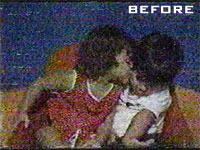
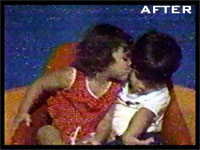
The above project was a multi-generation VHS tape in EP mode, at one time even being converted from PAL to NTSC. It was obviously copied with coaxial cables on cheap VCRs onto cheap tapes, given the noise, grain and color loss. The project involved hardware and a double pass through two separate pieces of software to correct these flaws as best as possible. Note how noise was removed, but the little polka-dots on the girls dress remain!
Restored Video Sample (B)
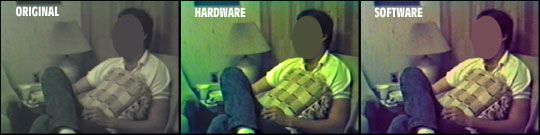
The above project was professional videos shot in a less than ideal environment, in terms of both audio and video. The color was almost entirely lost and the contrast was dismal. It was run first through hardware, then a single pass through software. Note how the color of the lamp (tan) was maintained in the final file, while the dark skin color and blue jeans had the color restored!
We will add some audio samples in the near future. Feel free to ask for more samples, if you’d like to see how we can correct a specific type of error.
The Following Conversion Services ARE NOT Available…
Physically damaged media. Our transfer/restoration services are for fixing signal errors and issues that exist as an inherent flaw of the VHS/S-VHS format. We do not work on moldy tapes, flood-damaged tapes, tapes that were in mudslides, tapes that have melted from fire, tapes where the magnetic particles are flaking off, etc. If your tape is crinkled, we can attempt to capture it as-is. We do not iron or bake tapes at this time. Contact us for references to other services that do provide this work.
8mm film or Digital8 tapes. We do not currently work with 8mm film (8mm, Super 8, etc) or Digital8 (D8) video tapes. Contact us for references to other services that do provide this work.
‘Un-erasing’ video tapes. When you record over a VHS/8mm/DV tape, your data is gone and has been replaced. This is why safety tabs exist on video tapes, to prevent this sort of mistake. Sorry, but your original information is gone forever. The magic filters you see in movies and on television shows like CSI do not exist.
Contact information:
Use the Contact Us form found in the menu at the top of the page (it’s a pop-up window). Try to answer these questions — and if you cannot, no worries, we’ll figure it out together:
For Tape-to-DVD work (VHS-to-DVD, 8mm-to-DVD, etc), we’ll need to know the following information about each tape:
1. Are you seeking basic conversion or advanced restoration?
2. Running time of the tape? In hours:minutes.
3. What kind of flaws are in the video, if any?
4. What kind of flaws are in the audio, if any?
5. Was the tape recorded in SP, LP, EP or SLP mode?
6. If this is a foreign (PAL) tape, do you want it converted to a PAL(non-USA/foreign) or NTSC(USA) DVD?
Describe problems however you can, tech terms are not required. We can usually figure out what flaws a person is talking about, when they use common language. We’ll look over the answers, maybe ask more question if needed, and then we’ll give you quote for the work that will likely be needed to purify the audio/video and transfer the video.
Also let us know if you want any extra services (such as special DVD menus, DVD cases with case artwork, web-ready versions, etc), and we’ll let you know what might be needed and any related costs.
For digital file work (creating web-ready or streaming video formats), we’ll need:
1. Desired format output (XVID, WMV, FLV, QT and MPEG-1 are most common). Optionally specify a maximum file per video (or state bandwidth restrictions), if required.
2. Source for the conversion. If source is VHS, answer the VHS-to-DVD questions too.
3. Running time of the source? In hours:minutes
4. What kind of flaws are in the audio, if any?
5. What kind of flaws are in the video, if any? Please note that digital source have very little latitude in regards to error removal. Software is the only means to remove the flaws, and it is inferior to analog methods for the most common video errors found in consumer-originated videos. If you have the analog source (VHS tape, for example), please submit that instead of the other digital source.
6. Are there any framerate preferences? If this question does not make any sense, just ask for 24fps, which is a popular standard (the same speed as professional motion pictures).
We look forward to working with you!
Policies and other fine print:
Policies are never fun to read, and it always makes people sound overly strict or mean. The policies are below are just here to answer common questions:
1. All work is pre-paid. Work will begin after payment is accepted. We only accept company check, cash, money order or Paypal.com payments. Paypal allows you to use credit cards, debit cards and Paypal funds from existing accounts. A Paypal account IS NOT REQUIRED to use a credit card. Ask us for an invoice, and one will be generated.
2. We will give you an estimated completion date in e-mail. Once the videos arrive, we will confirm this date, or extend/shorten it as needed, as prescribed by the workload that needs to be done. Please do not e-mail us more than once a week if you are inquiring about the status of a project. Having to answer these sorts of petty e-mails steal away valuable work time. Video projects generally take 2-3 weeks, on average. Advanced restoration projects, especially multi-tape projects, can take from 3-8 weeks.
3. Source only? Sometimes, some people just want us to convert the source, not author it. We gladly grant this request, dumping your raw source files onto a DVD. Since this saves time and workload, it can reduce costs slightly.
4. Bulk discounts? Because priced are quoted on a per-project basis, the lowest possible price is already being quoted. Please remember that our service often out-prices competitors (at least ones that do quality work on quality equipment). We might consider discounts on projects in the $5,000+ range, depending on what tasks are involved.
5. Office visits? Phone calls? At this point in time, no public offices are available. No public phone numbers are available. We are unable to accommodate customers in this manner. E-mail is the primary means of communication, if for no other reason than it provides plenty of documentation that either party can refer back to at any time. Should we find telephone communication necessary, to discuss a project at length, we may at our discretion call you at a number that you provide. For projects in the Nashville, Tennessee or Dallas, Texas area, we can sometimes arrange to pick up a large project.
Again, we look forward to working with you!
